Your Figma library probably has a button that looks right until someone tries to build with it. The colors are partly connected to variables, one variant has a different height, and the version in the codebase has quietly become something else. Give AI that starting point and it has several conflicting answers to the same question.
I’ve been exploring a Figma to Storybook workflow that starts by making those disagreements visible. I took an existing button, used AI to audit its tokens and behavior, and brought it into the codebase with documented usage rules. The useful outcome was a working component that explained when to use it, which variations were supported, and what the team had actually agreed on.
For a product team trying to ship with AI, that context matters every time someone builds a feature. Here’s how I approached the first component, including the decisions I still needed to make myself.
Watch the Figma to Storybook walkthrough
Table of contents
- What does a Figma to Storybook workflow involve?
- Start by auditing your design tokens
- Compare one Figma component with the codebase
- Write the component usage rules before building
- Build the component and its Storybook documentation
- Review the working component before repeating the process
- Common questions about Figma, Storybook, and AI
What does a Figma to Storybook workflow involve?
A Figma to Storybook workflow takes a design component, checks it against existing code and product rules, and implements the agreed version as a reusable component with interactive stories and documentation. AI can help audit and build it, while the team resolves conflicting sources and approves the behavior.
Storybook is a tool for developing, testing, and documenting UI components in isolation. A story shows a component in a particular configuration, such as a secondary button with a leading icon. Its documentation tools let you combine those examples with explanations of how the component should be used.
In my setup, I worked in the product repository through Conductor and used Figma Console MCP to inspect and update the design library. If you’re adapting this, check which Figma integration you have and whether it supports the changes you need. Figma’s MCP documentation explains the division of work: the server supplies design context, and the agent writes code using that context and your project instructions.
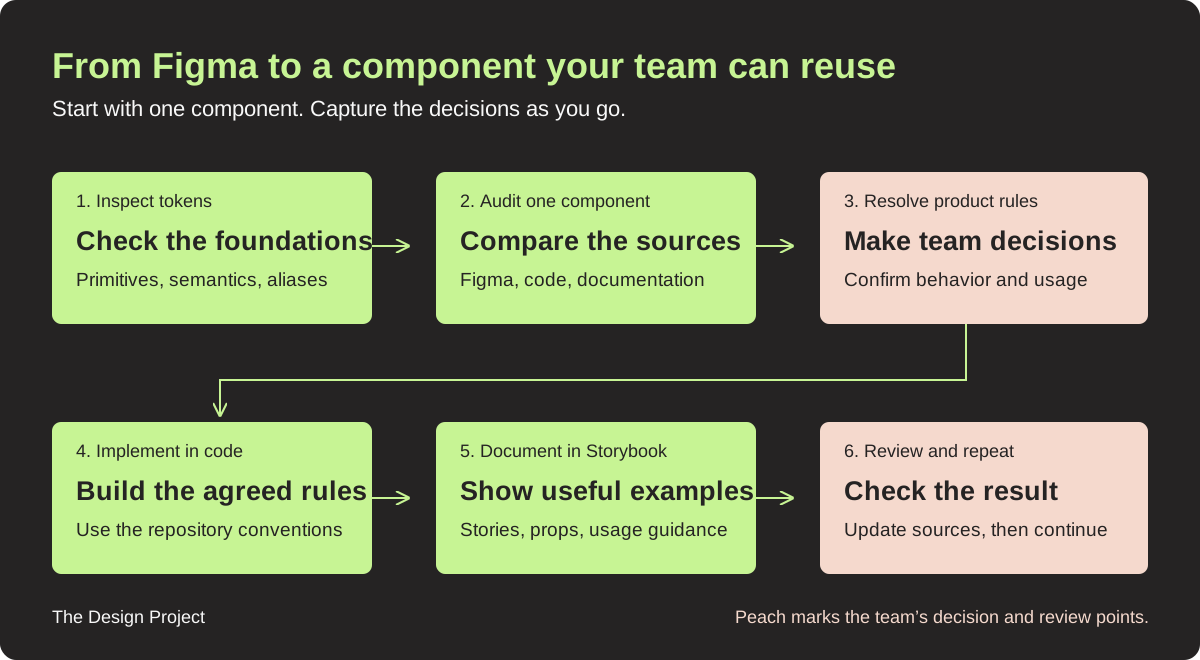
For the first component, the process looked like this:
- Inspect the existing variables and repair gaps in the design tokens.
- Compare the Figma component with its existing implementation and documentation.
- Resolve the questions that affect appearance, behavior, and usage.
- Implement the agreed component in the repository.
- Add focused stories, prop descriptions, and longer usage guidelines.
- Review the rendered result and update the sources before moving on.
Start by auditing your design tokens
Inspect the foundations before asking AI to reproduce a component. If a semantic color contains a raw hex value while the rest of the library references primitives, the component can look consistent today and still become difficult to maintain when the palette changes.
Primitive tokens hold base values, such as a shade of green. Semantic tokens describe a role, such as the background of a success message, and can reference those primitives. That relationship helps explain both the value and its intended use.
In my color audit, AI reported 56 semantic color tokens. Of those, 37 used raw hex values and 19 were already linked. It also surfaced gaps in the primitive palette, opacity differences, and duplicate tokens, which gave me a much clearer starting point than opening every variable manually.
Here’s an adapted prompt you can use:
Inspect the variables in this Figma design system. Report the primitive and semantic collections, naming inconsistencies, raw color values, and duplicate tokens. Identify which semantic colors can reference existing primitives and which need a new primitive. Show the findings before changing anything.
I worked through the findings in stages: add the missing primitives, update the semantic references, then inspect the result again. Some values still needed cleanup after the first pass. That second look was part of the work.
I also asked AI to create a visual reference of the primitive and semantic colors, including their light and dark appearances and usage descriptions. During review, it identified a swatch rendering gray when it should have been green. Seeing the colors together made that kind of error easier to catch, and the usage notes gave the team a place to explain what each color meant.
Compare one Figma component with the codebase
Choose one component and inspect all the places that define it. I started with a button because its variants, states, labels, and icons made the gaps easy to discuss without auditing the whole product at once.
The button audit reported 40 Figma combinations: five styles, two sizes, and four states. That sounded fairly complete until we looked at the details. The secondary button had a different height range from the other styles, some interaction values weren’t linked to tokens, and usage guidance was missing.
The codebase added another layer. The existing shared button was used on landing and pricing pages and looked different from the Figma version. Documentation also disagreed about typography. Those findings created specific questions we could resolve with engineering and design.
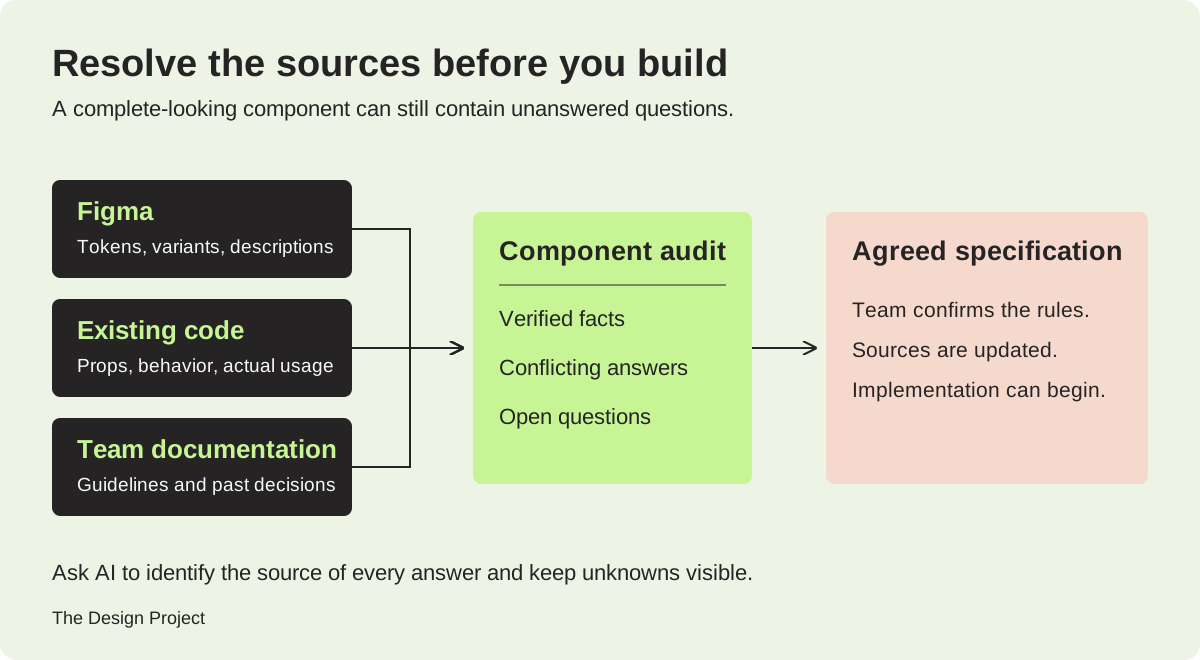
The most useful instruction was to identify the source of every answer. Otherwise, a plausible recommendation can quietly become a product rule that nobody agreed to.
Audit only the button component. Inspect its Figma descriptions, properties, variants, and tokens, then find any existing implementation and team usage guidelines. Identify the source of each finding. Separate verified facts, recommendations, and unknowns. Flag disagreements between Figma, code, and documentation. Ask the unresolved questions that affect correct behavior before implementing anything. Do not invent product rules.
Component by component, the conversation stays manageable. A designer and engineer can make a decision about one button’s height or pressed state much more easily than they can respond to a giant report about everything wrong with the library.
Write the component usage rules before building
Document the choices a teammate would otherwise need to ask you about. A component’s name and appearance give AI a starting point; its usage rules explain which decisions are appropriate in your product.
For the button, I used a questionnaire covering these areas:
| Area | What to capture |
|---|---|
| Anatomy | Named parts, including the container, label, and optional icons. |
| Props and defaults | Configurable inputs, allowed values, and the baseline configuration. |
| Variants and states | Supported styles, sizes, and interaction behavior. |
| Invalid combinations | Unsupported configurations and the reason to avoid them. |
| Composition | Nested components, slots, and examples in a real layout. |
| Usage and alternatives | When to choose the component, common mistakes, and what to use instead. |
| Source information | Where the specification came from and which decisions were confirmed. |
One question exposed a rule I had been carrying around in my head: how many primary buttons should appear together? We clarified it for this product as one primary action per section or dialog, with no two primary buttons directly next to each other. That was much more useful than a vague instruction to “use primary buttons sparingly.”
Other decisions were specific to this library. I chose the deep carrot destructive color already used in code because I believed the Figma version was outdated, asked for consistent secondary-button heights, and added a pressed state to Figma. We also decided against a dedicated loading variant for this particular button at that point.
Those choices belong to the product being built. Your team may need different destructive styling or a loading state, and visual decisions still need accessibility review. The valuable part is capturing the reasoning, confirming it with the right people, and updating Figma and documentation when a decision changes.
Build the component and its Storybook documentation
Once the behavior is agreed, have the agent implement that specification and document the same component in Storybook. Keep the code, examples, and guidance connected so the next person can see how the rules apply.
I created a separate branch for the Storybook work and asked the agent to consult Storybook’s documentation when setting up the project. If your team already has Storybook, work within that setup and involve engineering before introducing another component API or changing the project configuration.
The documentation had three useful layers. Comments on the component and its props explained the API close to the code. Focused stories demonstrated supported configurations and when to choose them. Longer MDX documentation held the usage guidelines, mistakes to avoid, and broader design-system context.
Here’s an adapted implementation prompt:
Implement the button using the confirmed answers and this repository’s conventions. Reuse the agreed tokens and existing components where appropriate. Document the component and props with JSDoc, create focused stories explaining when and why to use each supported configuration, and add longer usage guidance with mistakes and alternatives. Use the project’s existing Storybook documentation setup. Verify that the examples and documented behavior match the implementation, and report any unresolved issues.
Make the documentation available to your AI agent
An agent needs a way to find and read the library when working on a feature. Depending on your setup, that can involve repository instructions, local component files, or a Storybook MCP connection.
Storybook’s current AI guide describes an MCP server that exposes component documentation, story generation, and testing tools. It also explains the components manifest, framework support, and the instructions needed to direct an agent to those tools. These AI capabilities are currently marked as preview, so check the requirements against your project’s version before adopting them.
That connection is a useful next step beyond the component build shown here. The practical question to test is whether your agent can locate the button, read its supported props, and use it correctly in a real feature request.
Review the working component before repeating the process
Review the rendered component alongside the specification before treating it as the pattern for the rest of the library. The documentation should describe what the component actually does, and the component should follow the decisions the team confirmed.
At the end of my build, Storybook had usage rules, interactive controls, a playground, and examples for the button styles, sizes, icons, and disabled configurations. I could change a prop and inspect the result directly. When something looked unexpectedly faint, checking the disabled setting helped explain what I was seeing.
For your review, check at least these areas:
- The supported variants, sizes, icons, and states render as agreed.
- Token references and any documented themes match the intended values.
- Keyboard behavior, focus visibility, semantics, and contrast receive an accessibility check.
- Stories and usage guidelines agree with the implementation, including unsupported combinations.
I got the first component and its documentation in place during a roughly 30-minute walkthrough. That’s a useful example of how approachable the first pass can be, with repository access and tooling already available. It doesn’t establish a delivery estimate for a whole library or replace engineering and accessibility review.
Once the first component has been reviewed, its questionnaire and documentation structure become reusable. I’d carry that process into the next component, then build toward composed patterns and page examples so the library explains how the product fits together. Keeping Figma and code aligned over time is a further maintenance task, with checks your team needs to define.
Common questions about Figma, Storybook, and AI
Can AI automatically turn a Figma component into a finished Storybook component?
AI can help inspect the design, write an implementation, and create stories. The team still needs to resolve conflicting sources, approve product behavior, and review the result. In my button example, the audit surfaced decisions about heights, destructive colors, pressed states, and primary-action hierarchy before implementation.
Do you need to clean the entire Figma library first?
You can start with one component and the foundations it relies on. Inspect the relevant tokens, compare that component with the codebase, and resolve its usage rules. This gives the team a small, reviewable example and a process to improve before expanding across the library.
Does creating Storybook keep Figma and code synchronized?
Creating stories documents the implementation at that point in time. Continued alignment needs a process for reviewing changes, updating the relevant sources, and checking for drift. In this workflow, I explicitly asked the agent to update Figma when we changed a design decision.
Bring your existing component library into the workflow
The most useful moment in this exercise was seeing the questions the audit surfaced. A button with dozens of variants still needed decisions about when to use it and which source to follow. Once those answers were captured, the component became a much more useful starting point for the next feature.
At TDP, we help product teams work through this in component-library sprints and workshops, from auditing the current library to documenting components in code. If your team is figuring out where to start, talk to The Design Project about your component library.